
DAY 1: Identify What’s Not Working


Why your listing isn’t performing (in 15 minutes)
Today, you’ll identify one underperforming listing to improve throughout the challenge.
Today you will:
- Identify one listing to improve (Step 1)
- Optionally compare it with competitors for deeper insights (Steps 2–3)
💡 Tip: Only update listings that aren’t performing well. If a listing already gets steady views and sales, it’s usually best to leave it unchanged; even if the SEO isn’t perfect.
Step 1: Identify One Underperforming Listing
Start by identifying a listing that isn’t performing well using the Listings Tool.
Note: This methodology requires your shop to be connected to eRank. Click here for more info on how to connect your shop.
How to Spot an Underperforming Listing
Once you’re in the Listings Tool, sort your listings using one of these options:
- Visibility Score: spot listings underperforming vs other Etsy shops
- Views: find listings with low views (not being discovered)
- Age: find older listings with little traction
- Grade: identify listings that need optimization based on Etsy best practices and listing performance.
👉 Pick one listing that stands out as underperforming.
If you’re unsure, start with the listing that has the lowest visibility score or views.
🔇 No audio: These videos are designed to be followed with on-screen instructions.
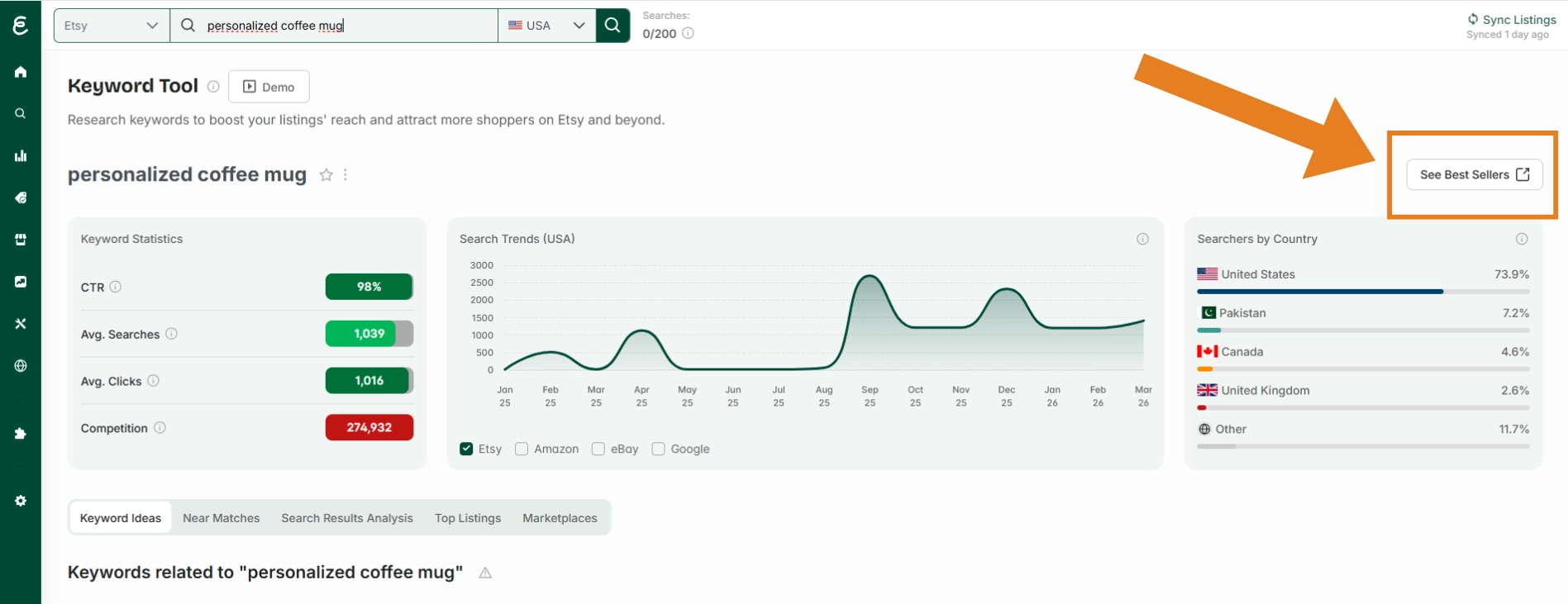
Go to the Keyword Tool, search for your product using descriptive keywords (e.g. “personalized coffee mug”), then click “See Best Sellers” at the top right of the results page.
Compare your listing side by side with competitors using eRank’s Compare Listings tool.
Learn how to compare listings with eRank:
🔇 No audio: These videos are designed to be followed with on-screen instructions.
Look for the biggest gap:
- Visibility → Are they getting more views/hearts?
- Performance → Do they show higher estimated sales or conversion rates?
- Keywords → Are they using better or different keywords?
- Images → Do their listings look clearer or more appealing?
- Offer → Are they priced or positioned differently?
- Shipping → What is their shipping pricing strategy?
You only need to identify one main issue.
What you accomplished
Today you:
✅ Identified an underperforming listing
✅ Compared it with competitors
✅ Found the main reason it’s not working
What's coming next
Tomorrow you’ll:
🗝️ Find high-impact keywords
🗝️ Build a keyword strategy
🗝️ Identify your Superstar Keyword
Day 1 Mini Quiz: Audit Like a Strategist

.webp)