Day 1 - Niche Down and Analyze Your Listings


Introduction
Welcome to eRank’s mini-challenge, “Spruce Up During the Summer Slump.” This program is designed to help Etsy sellers refine their shops, learn how to research keywords efficiently, and (potentially) increase views, visits, and sales. Over the next four days, we’ll walk you through how to pinpoint your niche, track changes you’ve made to your listings, improve your listings’ thumbnails, and see the exact keywords shoppers use to find your products. On the final day, we’ll discuss how to prepare to step away from your shop and take a well-deserved summer break.
Reviewing What Worked For the Holidays
Historically, November and December are the busiest months of the year on Etsy. Many shops also see a decent amount of traffic in January & February, with shoppers using gift cards, taking advantage of post-season sales, and celebrating Valentine’s Day. During the spring and summer, traffic slows down on Etsy (and throughout retail in general). When warmer weather comes, people spend more time outside in nature and away from their devices. That makes this an ideal time to “overhaul” your shop. During your overhaul, you’ll be able to determine what’s helping your shop grow, as well as what may be hindering it from certain growth opportunities.
What Listings Worked for You
When an Etsy listing sells or renews, its expiration date extends by four months. May is a great time to review your recently expired listings and your listings that will expire soon. It’s also a good time of the year to determine whether or not you have “niched down” your shop enough. While it is tempting to try and cater to a wide audience by offering many different types of products and styles, the most successful shops on Etsy have a clear, well-defined niche. You want visitors to come to your shop and feel as if the items in your shop were made specifically for them. Google also rewards “authority in your niche”, which can help if you run offsite ads through Etsy. (Quote from The Beginner's Guide to Google SEO)
If your shop has any listings that didn’t sell over the holidays or winter, ask yourself: “Do these items fit within the interests of my target audience?” Then, dive into which of your listings performed well and find common threads between them.
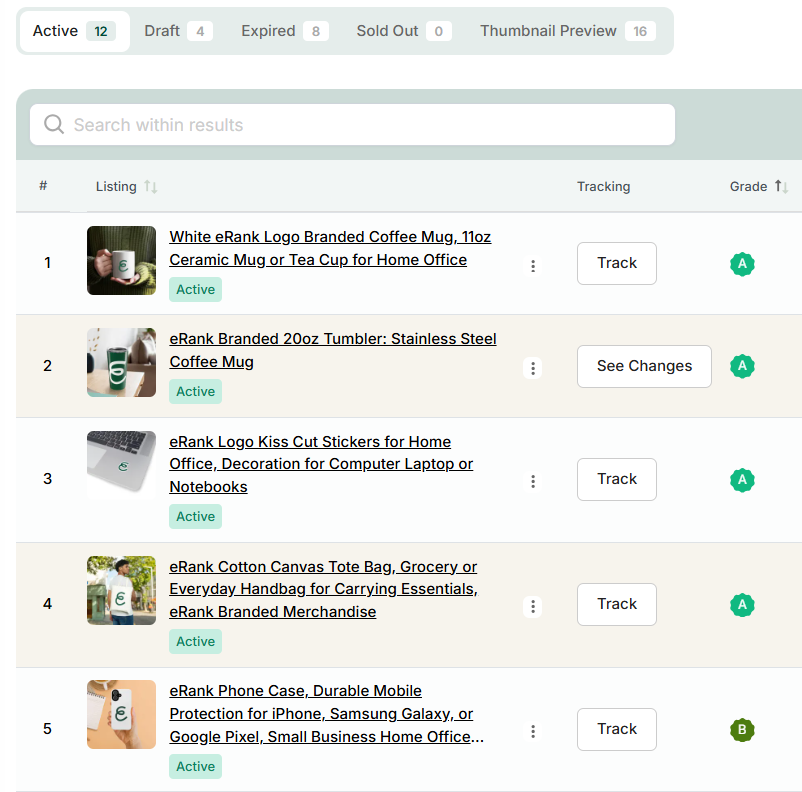
Use eRank’s Listings tool to view your active, draft, expired, and sold out listings. Click on any listing’s title to view the Listing Audit for that product. There, you can view metrics such as daily views, sales, and conversion rates. Additionally, you can use the Compare Listings tool to compare your listings side-by-side. When viewing your listings side-by-side, it’s easy to spot those that perform well and those that lack views and sales. If you don’t already have a defined niche for your shop, analyze the types of listings that perform well in your shop and make a note of what characteristics they share. For other ideas on how to define and refine your shop’s niche, read our blog post 5 Steps to Find Your Niche.

Removing Underperforming/Non-Niche Listings
You have a few options when determining whether or not you should delete certain listings or product lines from your Etsy shop. If you have physical inventory on hand (as opposed to POD or digital listings), it may make sense to run a sale for just those listings. When running a sale, follow all applicable discount laws for your country, as well as Etsy’s policies regarding sale practices, which are outlined in their Understanding Truthful Advertising and Discount Practices article.
For listings that have expired that you want to remove from your Etsy shop completely, consider listing them on alternative marketplaces such as eBay, Facebook Marketplace, and Amazon Handmade. Use eRank’s Keyword Tool or Trend Buzz to learn which of these marketplaces may be best for your products.
If a listing is about to expire and it’s time to give it a refresh, ensure that your listings are set to renew manually, as opposed to automatically. To learn how to do this, read this article in the Etsy Help Center. This gives you time to refine those listings while they are paused. Shoppers won’t be able to see those listings while you adjust keywords, swap out thumbnails, or make other edits.💡Tip: Sellers can edit their sold-out, inactive, or expired listings via the Etsy Seller App without having to renew the listing.
For more advice on your options, read eRank’s How to Manage Underperforming Etsy Listings blog post. The tips in this blog post can apply not only to physical sellers, but POD and digital sellers as well.
Traffic Stats & Google Analytics for Future Analysis
Now that you have a clear idea of your niche and which products already bring traffic to your shop, it’s time to learn how shoppers find you. eRank’s Traffic Stats tool uses data from shoppers to display the keywords that bring traffic to your shop. Connect it to both your Etsy shop and Google Analytics to get the most out of this valuable data.
If you don’t already have Google Analytics and eRank synced, read our step-by-step guide to learn how.
Today’s Tasks:
- Clearly define your target audience and niche.
- Compare 2 or more of your listings to learn which types of products sell the most in your shop.
- Choose at least 1 listing that fits in your niche to keep in your shop, even if it underperformed during the holidays This will be the one you work on for the next few days!
.webp)